Grading Submissions with Images
Grade submissions that hold figures, screenshots or scanned pages, with LLM judges and with decision models, and keep them in dataset files.
The Scenario
Students hand in short data-analysis reports, each a chart with a caption that interprets it. Your rubric asks whether the axes are labelled, whether the caption states the trend the chart shows, and whether the chart type suits the data. A text-only judge cannot check any of this, because the evidence is in the picture. You want a judge to see each chart beside its caption, and you want the reports in a dataset file that a teaching assistant can label and that moves with its figures.
What You'll Learn
- Building submissions from
Imageand text withContent - Grading them with an LLM judge, one call per criterion or the whole rubric in one call
- Grading them with a decision model (Jev), which fits each image into its limits
- Writing image parts into a dataset file and loading it back
- Which image formats each kind of judge accepts
The Solution
Step 1: Put Images in the Submission
A submission is Content: a string, an Image, or a list of strings and images read in order. A list such as a chart followed by its caption is a document, and the judge sees its parts in that order:
from autorubric import Image

report = [
    Image("reports/alice/chart.png"),
    "Figure 1. Accuracy rises with model size and levels off above 7B parameters.",
]
This is Alice's report as the judge receives it, the chart first and then its caption:
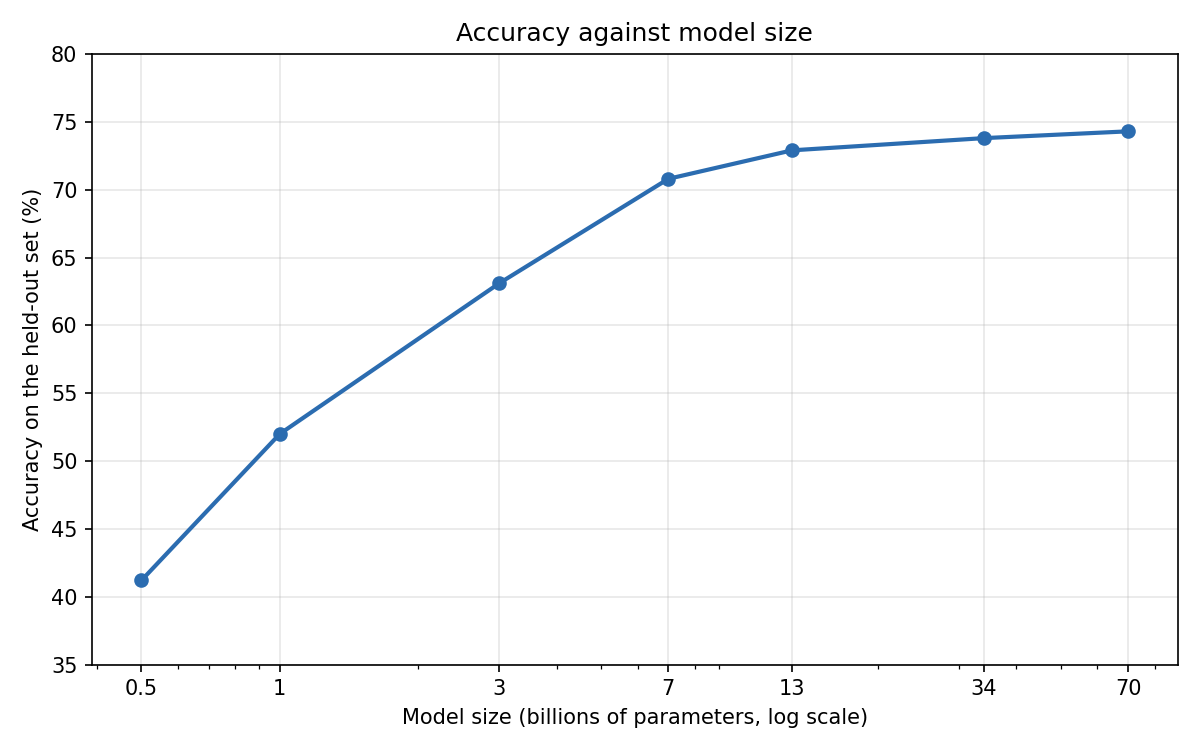
Image(path) reads nothing when it is made. The file is read once per grade, before any judge is called, and a missing or unreadable file raises from the grade instead of turning into a verdict. Image(data) takes bytes you already hold (from a database, or rendered by your own code), and its format is checked at once. An image is PNG, JPEG, GIF or WebP.
The query and the reference submission are Content too, so a task prompt can show the data the chart was made from, and a reference can be a model answer's chart.
Step 2: Grade with an LLM Judge
from autorubric import Criterion, Image, LLMConfig, Rubric
from autorubric.graders import CriterionGrader

rubric = Rubric([
    Criterion(name="axes", weight=5.0, requirement="Both axes of the chart are labelled, with units"),
    Criterion(name="trend", weight=10.0, requirement="The caption states the trend the chart shows"),
    Criterion(name="chart_type", weight=5.0, requirement="The chart type suits the data shown"),
])

grader = CriterionGrader(judge_model_config=LLMConfig(model="openai/gpt-5.6-luna"))
result = await rubric.grade(
    to_grade=report,
    grader=grader,
    query="Plot accuracy against model size and interpret the result in a caption.",
)
The reports against the rubric
Alice and Bob plotted the same results. The tables give the verdict each criterion should get, as a teaching assistant would label them; they are not the output of a model.
| Criterion | Weight | Requirement | Verdict | Why |
|---|---|---|---|---|
axes |
5 | Both axes of the chart are labelled, with units | MET | Model size in billions of parameters; accuracy in % |
trend |
10 | The caption states the trend the chart shows | MET | The curve climbs to 7B and is nearly flat after it, as the caption says |
chart_type |
5 | The chart type suits the data shown | MET | A line over ordered sizes, on a log axis that spaces them evenly |
| Criterion | Weight | Requirement | Verdict | Why |
|---|---|---|---|---|
axes |
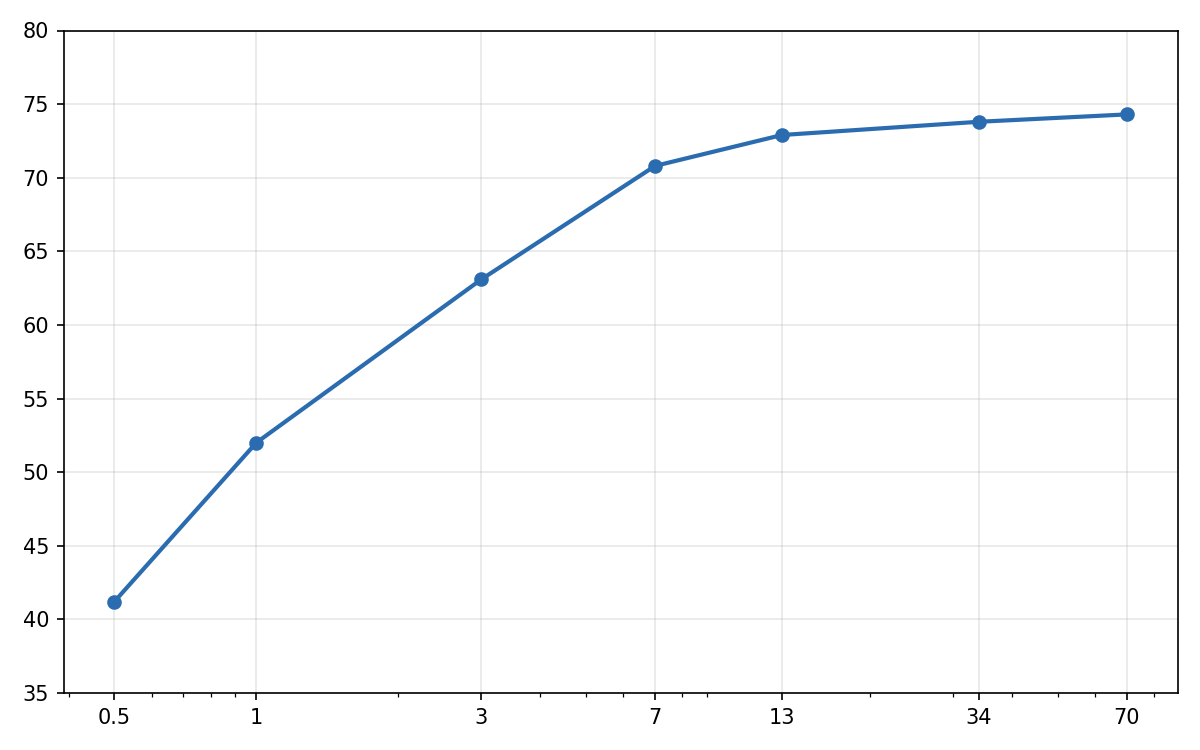
5 | Both axes of the chart are labelled, with units | UNMET | Neither axis has a label, so neither has units |
trend |
10 | The caption states the trend the chart shows | UNMET | The curve levels off above 7B; it does not keep climbing steadily |
chart_type |
5 | The chart type suits the data shown | MET | The same line chart as Alice's |
Bob's caption reads as a fine caption on its own. Only a judge that sees the chart can tell that the curve flattens above 7B, so a text-only judge cannot grade trend at all, and with the image it is the criterion that separates the two reports.
The model must accept images; gpt-5.6-luna does. The judge receives each image inside the prompt, where it occurs in the submission, as an OpenAI-style content part that LiteLLM translates for other providers (see Images in Prompts).
autorubric never sends an image to an LLM judge that is not known to accept images. The first time a grader is to send a judge an image, it looks the judge's model up in LiteLLM's model map (litellm.model_cost) to see whether the model accepts images, and keeps the answer for every later item. The lookup reads the map LiteLLM loaded at import and sends no request. LiteLLM fetches that map from its repository at import unless LITELLM_LOCAL_MODEL_COST_MAP=True is set. A model given with a responses/ route, such as openai/responses/gpt-5-mini, is looked up by its model. A model the map does not list as accepting images raises ValueError naming the judge and the model, before any judge sends a request. The same holds for every judge that could be sent the image, including each member of a panel and a cascade's escalation judges. Text-only grading never asks.
LiteLLM's map does not hold every vision model. Models served through Ollama, vLLM or OpenRouter, such as a LLaVA or Qwen-VL model, are often missing from it, and so are refused. If your model does accept images, declare it on the judge's config:
The declaration wins over the map, in both directions. images=False refuses images for a model the map lists, which is useful when an endpoint serves a text-only variant under a listed name. Training items whose submissions hold images are checked when the grader is built, because every call of the judge shows them.
The length penalty counts words of text only, so an image adds nothing to it. Few-shot training items may hold images as well, and an LLM judge sees each example's images in its examples.
Step 3: Grade with a Decision Model
A decision model answers the whole rubric in one request whatever llm_calls says. Jev accepts images from jev-1.14.0 on:
from autorubric import DecisionModelConfig, decision_model_capabilities
from autorubric.graders import CriterionGrader

jev = DecisionModelConfig(model="jev-1.14.0")  # needs pip install 'autorubric[typesafe]'
grader = CriterionGrader(judge_model_config=jev)
result = await rubric.grade(to_grade=report, grader=grader)

print(decision_model_capabilities("jev-1.14.0"))
# {'provider': 'typesafe', 'images': True, 'image_formats': ('png', 'jpeg'),
#  'min_side_px': 280, 'max_side_px': 1568, 'max_image_bytes': 16777216,
#  'max_request_bytes': 33554432}
Jev reads only PNG and JPEG with sides between 280 and 1568 pixels, and it does not resize images itself. autorubric therefore fits each image before sending it. An image already inside these limits is sent unchanged. Any other is re-encoded as PNG or JPEG, scaled to fit, and padded with white when a side is still too short, as for a very wide chart. Images gives the exact rules. To keep a chart exactly as you made it, save it as a PNG within those sides.
Which models accept images comes from autorubric's decision-model registry. A model it lists as text-only, such as jev-1.13.0, or a model it does not list, raises ValueError naming the judge and the model as soon as content holds an image, and no judge sends a request, not even the LLM judges of a mixed panel. Model Capabilities has the entry format.
For a model the registry does not list, such as a self-hosted endpoint, declare what it accepts on the judge's config, without editing the installed package. Pass DecisionModelConfig(model=..., capabilities={...}) with the entry the registry would hold, such as {"provider": "my-org", "images": True, "image_formats": ["png"], "min_side_px": 64, "max_side_px": 1024, "max_image_bytes": 4_000_000, "max_request_bytes": 8_000_000}. Images are then fitted into those limits. The declared entry replaces the registry's for that judge, so it can also tighten a listed model's limits.
In a cascade, the escalation judges are LLM judges, and llm_calls applies to them as well. Called per criterion, an escalation judge receives the images in its call for each escalated criterion; with llm_calls="per_item", in its one call for the item.
Step 4: Keep Images in a Dataset File
In a dataset file an image is an object whose only key is "image", and a document is an array of strings and image objects:
{
  "name": "chart-reports-v1",
  "prompt": "Plot accuracy against model size and interpret the result in a caption.",
  "rubric": [
    {"name": "axes", "weight": 5.0, "requirement": "Both axes of the chart are labelled, with units"},
    {"name": "trend", "weight": 10.0, "requirement": "The caption states the trend the chart shows"},
    {"name": "chart_type", "weight": 5.0, "requirement": "The chart type suits the data shown"}
  ],
  "items": [
    {
      "submission": [
        {"image": "reports/alice/chart.png"},
        "Figure 1. Accuracy rises with model size and levels off above 7B parameters."
      ],
      "description": "alice",
      "ground_truth": ["MET", "MET", "MET"]
    }
  ]
}
A relative path is resolved against the directory of the dataset file, so the file and its reports/ folder can be moved or shared together:
from autorubric import Image, RubricDataset, evaluate

dataset = RubricDataset.from_file("chart_reports.json")
dataset.add_item(
    submission=[Image("reports/bob/chart.png"), "Figure 1. Bigger models are better."],
    description="bob",
)
dataset.to_file("chart_reports.json")  # image paths written relative to the file's directory

result = await evaluate(dataset, grader, show_progress=False)
Loading opens no image, so a dataset whose figures are missing still loads, and the missing file is reported when its item is graded. An image built from bytes has no path; to_file saves it beside the dataset file as chart_reports_images/<sha256>.<ext>. An experiment's manifest records "images": true for a dataset that holds images. Images in Dataset Files covers paths, from_json and to_json in full.
Bound the number of items graded at once
Each item being graded holds its images in memory from the start of its grade until the grade finishes, including any time it spends waiting on a rate limit. An LLM judge also holds each image as a base64 data URL, about a third larger than the file, and a decision model holds the image as fitted for its request. EvalRunner and evaluate() start every item at once unless max_concurrent_items is set, so by default a dataset's images can all be in memory together. With 10,000 figures of 2 MB each, that is tens of gigabytes. For an image dataset, set max_concurrent_items (in EvalConfig, or as the evaluate() keyword) to a few times the number of requests your provider allows in parallel. Memory then grows with that limit rather than with the size of the dataset:
Step 5: Check the Formats Your Judges Accept
| Judge | Formats sent | What autorubric does |
|---|---|---|
| LLM judges | The image's own format | Sends the original bytes as a data: URL, never converted or resized, and only to a model LiteLLM lists or you declare (LLMConfig(images=True)) as accepting images. The provider's limits on formats, size and number of images apply. |
Jev (jev-1.14.0, jev-latest) |
PNG and JPEG only | Fits every image: converts GIF, WebP and other unsupported encodings, scales, and pads with white. |
PNG and JPEG are the safe choice for every judge. GIF and WebP are not accepted by every provider or model: some take only still GIFs, some do not list GIF at all, and a local model may read neither. A provider that refuses an image usually answers with a bad-request error, and the criterion then abstains (CANNOT_ASSESS) with the error on its report. If that happens, convert those images to PNG before grading:
import io

import PIL.Image as pil_image

from autorubric import Image


def as_png(path: str) -> Image:
    """The image at ``path`` (its first frame, for an animation) as a PNG held in memory."""
    buffer = io.BytesIO()
    with pil_image.open(path) as opened:
        opened.save(buffer, format="PNG")
    return Image(buffer.getvalue())
Custom graders
The abstract Grader.judge is annotated with Content for to_grade, query and reference_submission, where it was str before. A custom grader whose judge still annotates them as str runs exactly as before, but a type checker now reports its override as incompatible; annotate them as Content (from autorubric import Content). Grader.grade now raises TypeError for a query or reference submission that is not Content, such as a number or a list holding one. A custom grader whose judges read only text can check for images with isinstance(to_grade, str).
Key Takeaways
Contentis a string, anImage, or a list of both read in order; it applies to the submission, the query and the reference submission- Images are read once per grade, and one that cannot be read raises instead of becoming a verdict
- LLM judges are sent images only when LiteLLM's model map lists their model as accepting them, or
LLMConfig(images=True)says so; any other judge is refused before a request is sent - Both
llm_callsmodes take images: an LLM judge receives them in each call per criterion by default, or once per item with"per_item" - Decision models get images fitted into the limits their registry entry (or declared
capabilities) gives (PNG or JPEG, 280 to 1568 pixels per side for Jev) - Dataset files hold images as
{"image": "<path>"}parts, resolved against the file's directory
Going Further
- Holistic Rubric grading - Validate
llm_calls="per_item"on labelled data - Decision-Model Judges - Jev alone, in a panel, or as a cascade's first pass
- Managing Datasets - Saving, loading and splitting datasets
- API Reference: Core Grading -
Image,ContentandToGradeInput